Meet Alex. He splits groceries with his flatmate. Nothing fancy — a few sabji runs, the occasional big shop. Two people, one shared list of expenses.
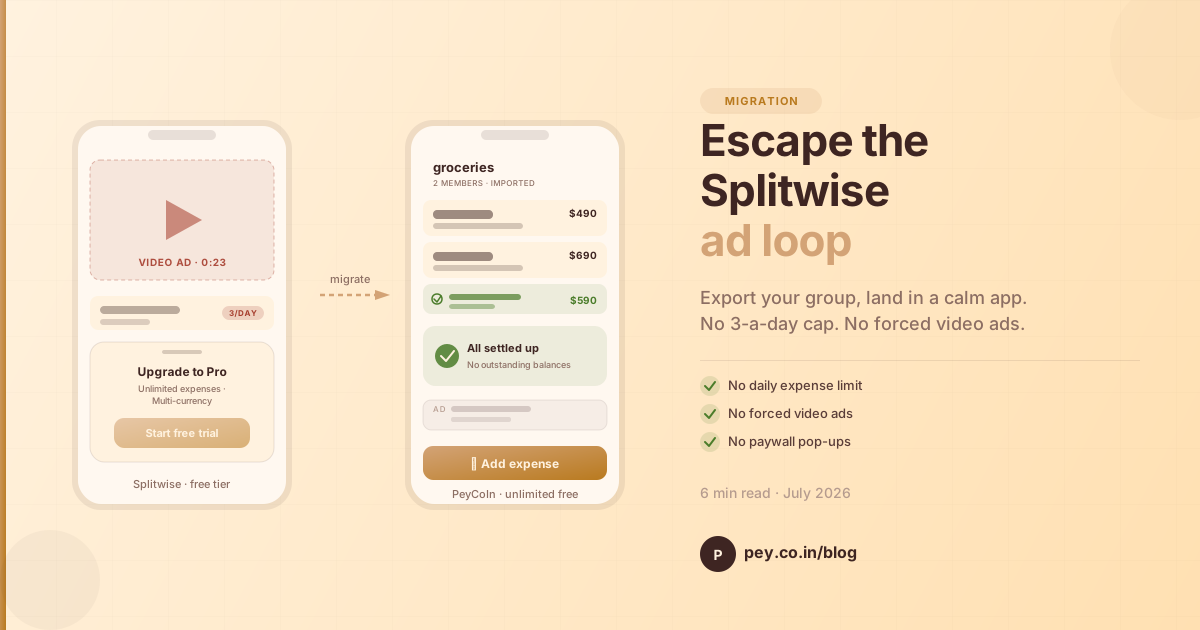
Today he opens Splitwise to add the third expense of the day. A full-screen video ad plays. He waits it out. He taps "add expense." A modal slides up: You've hit your free limit. Upgrade to Splitwise Pro. Paywall. He closes the app.
This is the quiet cost of the "free" expense-splitting app: your time and your attention, paid in three-a-day increments.
What Alex is actually paying for
The free Splitwise tier, as it exists today, comes bundled with:
- A 3-expense-per-day limit. Add a fourth and you're locked out until tomorrow — or you pay.
- Video ads before actions. Not a small banner. A full-screen video you sit through before you can log the ₹120 auto ride.
- Paywall pop-ups. Trying to add multi-currency? Trying to add more than three? The upgrade sheet is always one tap away.
None of these help you split expenses better. They exist to move you toward paying. Fair enough — it's a business. But it's also why so many people describe using Splitwise as "loud."
The calm alternative
PeyCoIn takes the opposite bet. On the free tier you get:
- No daily limit. Add 3 expenses. Add 300. It's the same app.
- No forced-watch video ads. One quiet banner ad funds the app. It doesn't interrupt you and it doesn't play a 30-second video before you can log dinner.
- No paywall pop-ups. Multi-currency, unlimited groups, unlimited expenses — all free. The moment you tap "add expense" is the moment you add an expense.
Alex's group data doesn't have to stay stuck in Splitwise, either. There's a clean way out — and a clean way in. Here's exactly what that looks like.
Step 1 — Export from Splitwise
Open the Splitwise group you want to move. At the top there's a small row of chips: Balances, Totals, Whiteboard, Export. Tap Export.
Splitwise generates a spreadsheet of every expense, settlement, and member in the group. On iOS it lands in the share sheet as a small text/CSV file, ready to send anywhere: Files, AirDrop, Messages, another app.
Tag it, save it to Files, or send it straight to PeyCoIn. That's the entire Splitwise side of the move.
Step 2 — Let PeyCoIn read it
Open PeyCoIn, pick the Splitwise file, and PeyCoIn parses it in a second. Before it touches anything, it shows you exactly what it found: how many expenses, how many settlements, the total, the people, and every individual line item.
If the numbers look right, tap Looks right, continue. If they don't, tap back and re-export. No data is written until you say so.
Step 3 — Match the people
Splitwise exports use display names ("Srabani santra", "shahi"). PeyCoIn asks you to point each name at either an existing contact in your app or at You. This is the only human decision in the whole flow — everything else is automatic.
Step 4 — Name the group and import
Give the group a name (Alex went with groceries). PeyCoIn shows a quick summary — expenses, settlements, members — so you know exactly what's about to land in your account, then creates the group.
Step 5 — Your group, in PeyCoIn
The imported group looks and behaves like a group you created from scratch. Every expense, the settlement Alex already made, the "who owes whom" math — all preserved.
Flip to Balances and PeyCoIn's minimum-payments engine takes over: it suggests the fewest transfers needed to settle everyone. In Alex's case, everything's already square.
Total elapsed time, from opening Splitwise to using PeyCoIn: under a minute. No ads on either end. No upgrade prompts. No "confirm your email" hoop.
Adding the other person to the group — scan, done
In Splitwise, inviting someone means typing their email or copying a share link into WhatsApp and hoping they open it. In PeyCoIn, the group has a QR code.
The person joining opens PeyCoIn's scanner, points it at your screen, and they're in. No emails, no links, no "did you get my invite?" follow-ups. It's the same one-tap feeling as adding someone on UPI — because that's the interaction people in India already know.
If you're not in the same room, the same QR resolves to a share link you can send over any chat app. Either way: no account required to see the group name, no forced signup before they know what they're joining.
What you keep
- Every expense. Amount, payer, date, description.
- Every settlement. Past payments come through as settlements, not new expenses — the math stays honest.
- The group itself. One import per group; do it for each Splitwise group you care about.
What you leave behind
- The 3-expense-per-day ceiling.
- Full-screen video ads before you can add ₹120.
- The "Upgrade to Pro" sheet sliding up every third tap.
PeyCoIn isn't going to make your expenses smaller. It's just going to stop making a scene about them. If you've been ignoring that Splitwise notification because opening the app feels like work, this migration takes less time than sitting through the ad you were about to skip.
The export button has been there the whole time. You just needed somewhere calm to go.
About PeyCoIn
PeyCoIn is a free app that combines personal budget tracking and group expense splitting — with UPI-connected settlement, offline-ready access, and zero data sales. Built in India, for India and the world.